QA weekly focus: SVG

This week, we are kicking off a continuing “QA Weekly Focus” to attract attention to certain topics and areas.

For this first week, let’s look into issues related to our SVG support.

SVG stands for “Scalable Vector Graphics“, a widespread, open vector format and standard. It has become the most used vector format on the web, and it is for example used as the default format in Inkscape, the open source vector graphics editor.

LibreOffice supports importing and exporting SVGs in various places, and these issues are tracked in 3 meta bugs:

  • 88278: SVG import image filter (all modules)
  • 111450: SVG fileSave filter (Draw/Impress)
  • 156066: SVG filters

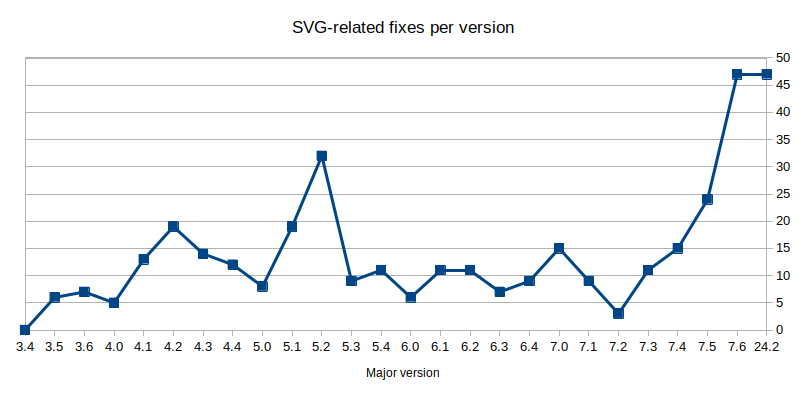
In recent months, the SVG topic got a fair amount of attention, in particular thanks to Xisco Fauli’s work on the import filter (see illustration).
Our friends at Inkscape have also recently voiced their interest in improving interoperability with LibreOffice (see Inkscape’s post on Mastodon).

So let’s keep the momentum going, test how well SVG files are handled by LibreOffice, and review existing reports! They might need to be clarified, consolidated, or even closed because of all the recent improvements.

The list of bugs to review is in this collaborative pad. You can join IRC to chat with the QA team, and ask questions.

Thanks everyone for your contributions!…

Read More

A community resolving issues collaboratively

Resolving issues and bringing improvements to LibreOffice is usually the result of team work – a team often made up of people who have never met each other!

As a Free / Open Source project, LibreOffice has contributors in the space of translation, documentation, development, design… and Quality Assurance (QA) from around the globe. Some might have contributed for decades, others just reported a bug for the first time yesterday.

Let’s have a look at three stories in which issues were identified, triaged and resolved in different ways, but always through a combined effort.

Many hands make light work

Take for example bug 153790 on Bugzilla. At least six contributors were involved in its resolution:

  • Ruud reported an issue in sheet referencing in Calc formulas;
  • Stéphane confirmed the issue, provided more precise steps and let others know that the issue is a regression;
  • ady pinpointed more precisely in which version the issue started;
  • raal bibisected the issue to a precise commit by Eike – the issue started in version 7.4;
  • Eike provided a fix for version 7.5;
  • Finally, Xisco created a unit test so the issue does not reappear in the future.

Looking into an issue reveals another

Here’s another story split between three reports.

It all starts with an enhancement in how Tables of Figures can be populated, which was originally an issue in OOXML compatibility. Since LibreOffice 7.6, it is possible to make a Table of Figures track an extra paragraph style for a more customised result (and for improved DOCX support).

Susanne tested it, noticed duplicated entries in the Table of Figures, and reported a separate issue in bug 157200.

At the time of writing, the issue Susanne reported is still being discussed. However, while testing (and learning about the feature), Stéphane noticed a problem in how the dialog resets the Table of Figures to using the “Figures” category instead of “Illustrations”. Turns out this GTK-specific issue was a regression from when the dialog was heavily refactored back in LibreOffice 6.3, and lived on unreported for more than four years. Once it was described in bug 157223, Caolán fixed the regression… less than two hours after opening the report!

Enhancements… and their consequences

One final example in bug 156282.

Bathsheba reported an Outline Folding issue that makes its use more cumbersome in Writer: not being able to fold/unfold all headings at once in the Navigator. She also pointed out an associated frustration in not seeing the hidden headings in the Navigator. Jim, who designed the feature, offered a solution for both issues, including greying out the hidden headings in the Navigator instead of hiding them. Two birds with one stone!

Unfortunately, the patch introduced a nasty regression: a crash when using the Navigator, only happening with the GTK interface. Thankfully, Timur caught the issue only two days after it appeared, and it was therefore quickly fixed by Jim two more days after – before it could affect general users of LibreOffice releases.

Thank you all!

These are three examples among thousands of others that illustrate how improving LibreOffice is a combined effort.

All these success stories wouldn’t have unfolded, and resulted in fixes and new features, if it wasn’t for the users initiating them with a report. So thank you all for reporting issues, but also for triaging the reports, re-testing older ones, and contributing fixes! By combining our various skills and diverse perspectives, we can continue making LibreOffice better for everyone, building on its 38 years of history.

Join us to learn new skills and meet other QA contributors!…

Read More

Investing in bug reports pays off

Document compatibility between office suites is a common concern for LibreOffice users. People take sample documents, expecting a pixel-perfect similarity with other office applications and rightly so. While we cover most aspects of formats outside the OpenDocument Format specification, LibreOffice’s native format, there are pieces that have not been implemented yet (for example smooth shadows, which have been implemented recently and will be available in LibreOffice 7.1). Of course we sometimes fail as well, like any other software producer. Microsoft’s “transitional” formats often include undocumented or obscure content that is hard for other office suites to parse.

One enormous advantage of open source software is that you can talk more or less directly to the developers. All bug reports and enhancement requests are taken seriously and will receive immediate response unlike what happens when you complain about issues to companies without open development models. Unfortunately not everyone knows about this advantage so we thought it’s time to recall.

The people doing quality assurance for LibreOffice is an ever-changing group of around 30 contributors. They analyse user reports tirelessly and always appreciate problem descriptions delivered in a clear and understandable way. In a recent article about LibreOffice appearing on dedoimedo.com, several bugs were reported, but in a rather incomplete way. It is understandable, if a journalist does not want to create proper reports in our bug tracker on top of writing an article. Maybe there is a middle-ground, though.

Simply linking to the problematic Microsoft Office templates would have made the work of the quality assurance team much easier. Now the templates shown in the screenshots had to be discovered through detective work on the MSO template site. Particularly unfortunate was the case of a template, which refused to open properly. There is no way of figuring out the identity of the document and the author never replied to an email requesting for more information. On the other hand, it might be time for the QA team to again methodically go through every single template on the MSO site – such work has been done before, resulting in many solved incompatibilities.

Detailed comments on the document template issues described in the Dedoimedo article

Fashion newsletter template: Some obstacles need to be considered regarding cross-application and probably also cross-platform compatibility questions. Documents written on one system might use a font that is not available on another. The article mentioned above talks about the word FASHION breaking into two lines in the MSO Fashion newsletter template. The reason for this wrapping is that the author did not notice they were missing the Century Gothic font. This can be seen in the Formatting toolbar, where the font name appears in italics and hovering over it shows a tooltip saying that the font is not available and has been substituted.

The author refers to an image border missing on the first page. Probably they meant the whole page margin on the right. This issue was not seen on Windows or Linux by testers.

The image stretching issue had not been reported before. The newly-created report contains an analysis on a level that is typical to the QA team. However, the QA team will gladly conduct further analysis on reports with less details. The image stretching issue is the same that is seen in the restaurant newsletter template

An issue not mentioned in the article is the incorrect lengths of the fuchsia-coloured lines on the first page. This was analysed through binary bisecting and found to have been reported before. This issue is an unfortunate side effect of a complex internal improvement in the handling of shapes.

Restaurant newsletter template: Testers did not see the issue with the placement of the restaurant logo.

Based on data in our bug tracker, LibreOffice saw over 330 fixes or feature implementations for MSO and RTF document issues in 2019. The number for 2020 is already over 330 at this point. The real numbers are likely higher as not every code change is connected with a report. These statistics clearly indicate that document compatibility is seeing significant investments from the commercial ecosystem and volunteers alike.

LibreOffice quality assurance is aided by many automated systems. One of these is called “Office interoperability tools”. It compares the output of Microsoft Office and LibreOffice over a huge corpus of documents in order to find regressions. Manual testing and problem discovery is still needed – we can’t automate the testing of issues we don’t know about.

As mentioned, while Microsoft’s “transitional” formats continue to use undocumented or cryptic content, which makes life difficult for other office suites, there’s a limit to what we can do. Ultimately, it would be better if everyone used the OpenDocument Format, to ensure maximum interoperability.

If you want to learn how to create high quality bug reports, please read our dedicated guide in The Document Foundation wiki.…

Read More